

Appearance
Synonym Search
The Synonym Search function enhances Voxel’s keyword search by allowing you to add synonyms to taxonomy terms. When users search for a term, results will also include posts tagged with synonyms of that term.
Overview
Users often search using different words than what you’ve used for categories. “Bars” might be searched as “pubs,” “nightclubs,” or “lounges.” This function lets you add these synonyms to your taxonomy terms so searches match regardless of the exact word used.
Key Features
- Add synonyms to any taxonomy term
- AI-powered synonym generation
- Bulk generate synonyms for entire taxonomies
- Automatic post re-indexing when synonyms change
- Synonyms column in taxonomy admin tables
- Toggle synonyms on/off per Keywords filter
Setup Instructions
Step 1: Enable the Function
- Navigate to Voxel Toolkit → Functions in your WordPress admin
- Find Synonym Search in the list
- Toggle the switch to enable the function
Step 2: Configure AI Settings (Optional)
To use AI-powered synonym generation:
- Go to Voxel Toolkit → Functions
- Find and enable AI Settings
- Choose your AI provider (OpenAI or Anthropic)
- Enter your API key
- Select your preferred model
- Save changes
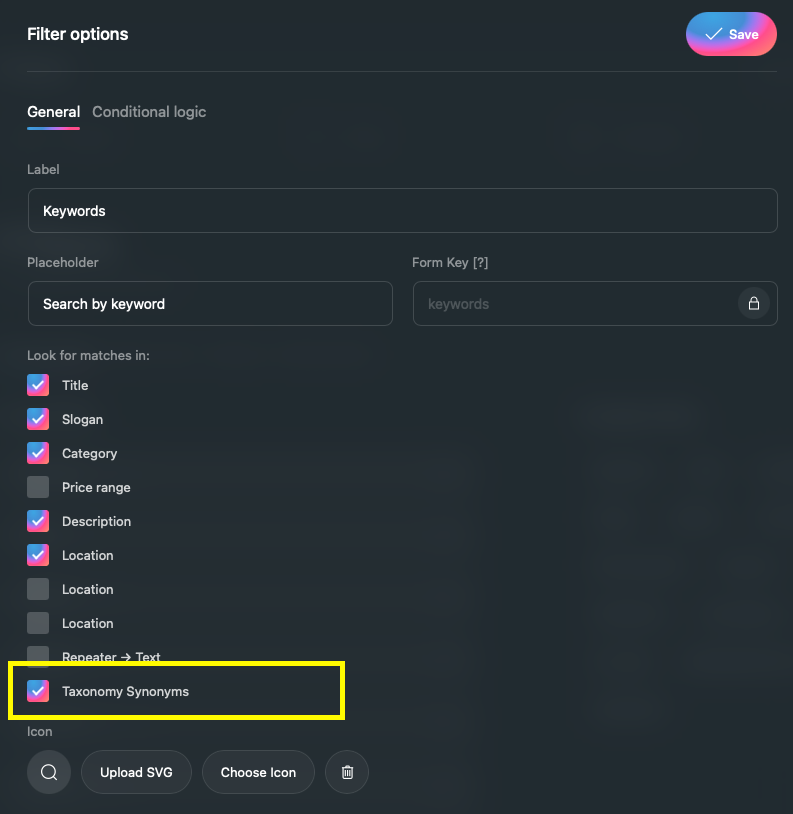
Step 3: Enable in Keywords Filter
- Go to Voxel → Post Types
- Edit your post type
- Go to the Filters tab
- Edit the Keywords filter
- In “Look for matches in,” check Taxonomy Synonyms
- Save the post type
Adding Synonyms to Terms
Manual Entry
- Go to any taxonomy in WordPress (e.g., Posts → Categories)
- Click on a term to edit it
- Find the Synonyms field
- Enter synonyms separated by commas (e.g., “pub, nightclub, lounge, tavern”)
- Click Update
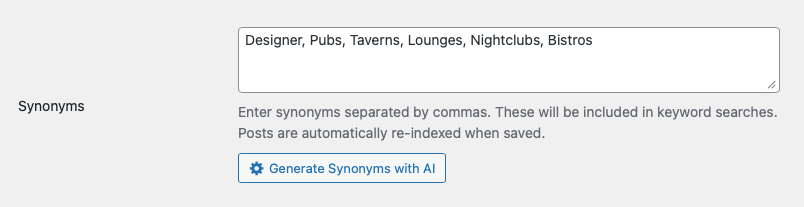
Posts with this term are automatically re-indexed when you save.
AI-Powered Generation
When AI Settings are configured, you’ll see a Generate Synonyms with AI button on the term edit page:
- Edit a taxonomy term
- Click Generate Synonyms with AI
- AI generates relevant synonyms automatically
- Review and edit if needed
- Click Update to save
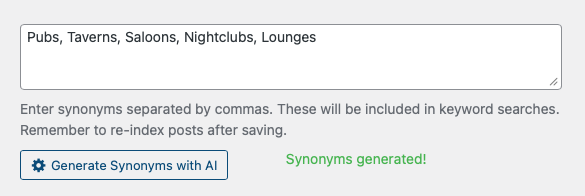
Clicking the button again will add more synonyms without replacing existing ones.
Bulk Generate Synonyms
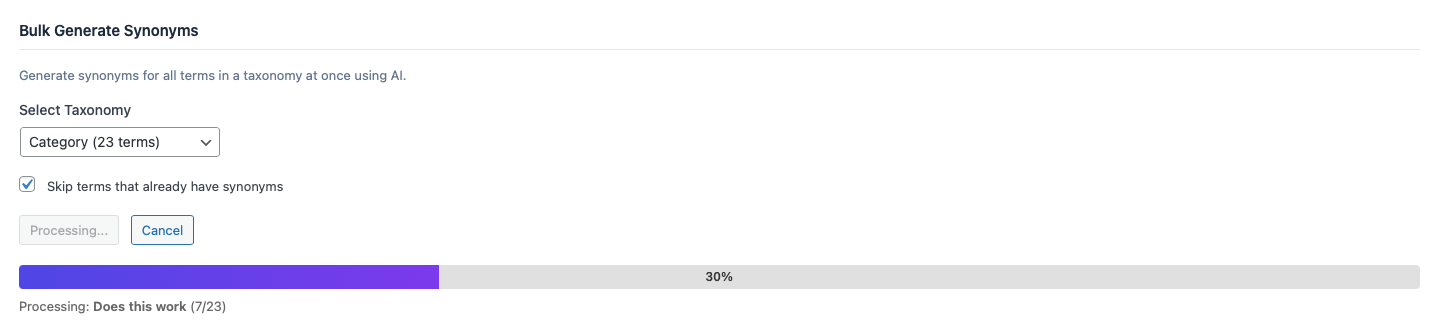
Generate synonyms for all terms in a taxonomy at once:
- Go to Voxel Toolkit → Functions
- Click the settings icon on Synonym Search
- In the Bulk Generate Synonyms section, select a taxonomy
- Optionally check “Skip terms that already have synonyms”
- Click Bulk Generate Synonyms
- Watch the progress bar as each term is processed
- Posts are automatically re-indexed as synonyms are added
You can cancel the process at any time. Progress is shown for each term being processed.
Function Settings
| Setting | Description | Default |
|---|---|---|
| Number of Synonyms | How many synonyms AI generates per term | 5 |
| Skip Existing | Skip terms that already have synonyms during bulk generation | Enabled |
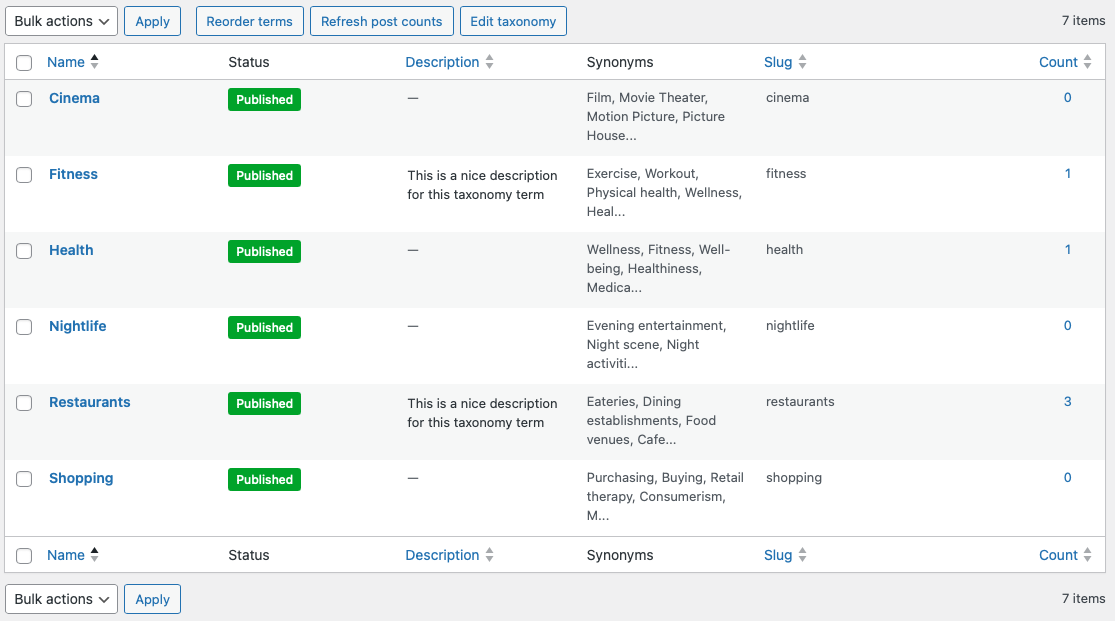
Synonyms Column
When the function is enabled, a Synonyms column appears in all taxonomy list tables:
- Shows synonyms for each term at a glance
- Displays “—” for terms without synonyms
- Long synonym lists are truncated with full text on hover
How It Works
When a user searches using the Keywords filter:
- User enters a search term (e.g., “pub”)
- Voxel searches the index for matching keywords
- Because “pub” is a synonym of “Bars,” posts in the “Bars” category match
- User sees relevant results even though they didn’t search for “bars”
Synonyms are stored in the search index alongside the term name, so searches are fast and efficient.
Use Cases
Directory Categories
Add synonyms to business categories: “Restaurant” → “eatery, diner, bistro, cafe, dining”
Location Names
Add alternative names for places: “New York City” → “NYC, Big Apple, Manhattan, New York”
Service Types
Cover different terms for services: “Plumber” → “plumbing, pipe repair, drain cleaning, water heater”
Product Categories
Match common search terms: “Laptop” → “notebook, computer, portable PC, MacBook”
Best Practices
Synonym Guidelines
- Include common misspellings – “barbeque, barbecue, BBQ”
- Add abbreviations – “doctor, dr, physician”
- Use regional variations – “apartment, flat, unit, condo”
- Include related terms – “gym, fitness center, health club, workout”
- Think like your users – What words would they search for?
AI Generation Tips
- Review AI-generated synonyms before saving
- Remove irrelevant suggestions
- Add industry-specific terms AI might miss
- Use bulk generation for large taxonomies, then review individually
Troubleshooting
Bulk generation reported success but the synonyms are blank
Fixed in 1.9.2. The request asked every model for 200 tokens, which a reasoning model such as GPT-5 spends on thinking, returning nothing visible. The empty answer was saved and counted as generated, so the run reported "generated: N, skipped: 0" while writing blanks — and it overwrote synonyms that were already there.
Since 1.9.2 an empty answer is skipped rather than saved, so existing synonyms survive a bad run, and the token budget scales with the number of synonyms requested. To raise it further:
php
add_filter( 'voxel_toolkit/synonym_search/completion_tokens', function( $tokens ) {
    return 4000;
} );
Synonyms are in American English
Choose British English as the response language under AI Settings. Added in 1.9.2; before that only "English" was offered, which models read as US English.
Synonyms Not Appearing in Search
- Ensure “Taxonomy Synonyms” is checked in the Keywords filter settings
- Verify posts have been re-indexed after adding synonyms
- Check that the function is enabled
AI Generation Not Working
- Verify AI Settings is enabled and configured
- Check your API key is valid
- Ensure you have API credits remaining
Synonyms Field Not Showing
- Confirm Synonym Search function is enabled
- Clear any caching plugins
- Check for JavaScript errors in browser console
Bulk Generation Stops
- Check for API rate limits
- Verify server timeout settings
- Try again – the process continues from where it stopped