

Appearance
Messages Admin
The Messages Admin function adds a top-level admin menu to view, search, and moderate all direct messages on your site.
Overview
Site administrators often need to review private messages for moderation purposes, customer support, or dispute resolution. Messages Admin provides a centralized admin interface to browse and manage all direct messages sent between users and posts on your Voxel site.
Key Features
- Top-level admin menu for quick access
- View all messages in a sortable table
- Filter by read/unread status
- Search by message ID, sender ID, or receiver ID
- Filter by sender type (user or post)
- Content search across all messages
- Mark messages as read or unread
- Delete individual or bulk messages
- Links to sender and receiver profiles
Setup Instructions
Step 1: Enable the Function
- Navigate to Voxel Toolkit → Functions in your WordPress admin
- Find Messages Admin in the list
- Toggle the switch to enable the function
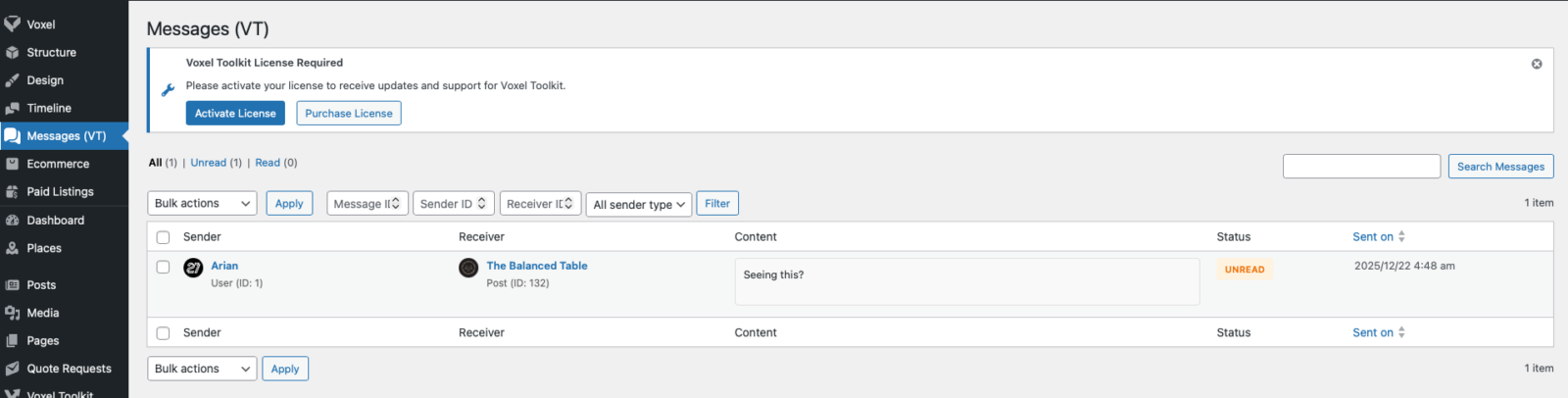
Once enabled, a new Messages (VT) menu item will appear in your WordPress admin sidebar, just below Voxel’s Timeline menu.
Using the Messages Page
Message Table Columns
The messages table displays the following information:
- Sender – The user or post that sent the message, with avatar and link to their admin profile
- Receiver – The user or post that received the message, with avatar and link to their frontend profile/page
- Content – The message text and any file attachments
- Status – Read or Unread badge
- Sent on – Date and time the message was sent
Filtering Messages
Use the view tabs to filter messages by status:
- All – Shows all messages
- Unread – Shows only unread messages
- Read – Shows only read messages
Additional filter options above the table:
- Message ID – Find a specific message by its ID
- Sender ID – Filter by sender’s user or post ID
- Receiver ID – Filter by receiver’s user or post ID
- Sender Type – Filter by User or Post senders
- Search – Full-text search in message content
Row Actions
Hover over any message row to reveal action links:
- Mark Read – Mark an unread message as read
- Mark Unread – Mark a read message as unread
- Delete – Permanently delete the message (with confirmation)
Bulk Actions
Select multiple messages using the checkboxes to perform bulk operations:
- Mark as read – Mark all selected messages as read
- Mark as unread – Mark all selected messages as unread
- Delete – Permanently delete all selected messages
To use bulk actions:
- Select messages using the checkboxes
- Choose an action from the Bulk Actions dropdown
- Click Apply
Use Cases
Customer Support
Review messages between buyers and sellers to help resolve disputes or answer questions about transactions.
Content Moderation
Monitor messages for inappropriate content, spam, or policy violations.
User Reports
Investigate reported conversations by searching for specific user IDs or message content.
Debugging
Verify that messages are being sent and received correctly when troubleshooting messaging issues.
Permissions
The Messages (VT) admin page requires the edit_others_posts capability, which is available to:
- Administrators
- Editors
This matches the permission level used by Voxel’s Timeline moderation page.
Database Table
This function reads from Voxel’s wp_voxel_messages table. The table stores:
- Sender and receiver information (type and ID)
- Message content
- File attachment references
- Read/seen status
- Timestamps
Troubleshooting
Menu Not Appearing
- Verify the function is enabled in Voxel Toolkit → Functions
- Check that Voxel theme is active
- Confirm your user has the required capability (Administrator or Editor)
No Messages Showing
- Verify messages exist in the database
- Check if filters are applied that might hide messages
- Try the “All” view tab
Sender/Receiver Shows “Deleted”
This indicates the user account or post has been deleted. The message data is preserved but the associated user/post no longer exists.
Requirements
- Voxel Direct Messages feature in use