

Appearance
Campaign Progress Widget
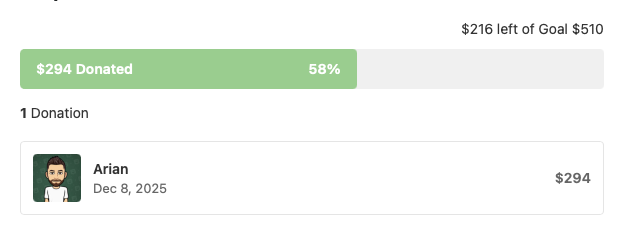
The Campaign Progress widget displays donation and crowdfunding progress for fundraising campaigns. Show your visitors how much has been raised, the goal amount, and a visual progress bar with recent donor information.
Overview
Track and display fundraising progress for campaigns, donations, or crowdfunding goals. The widget shows the amount raised, remaining amount, percentage progress, donation count, and optionally a list of recent donors with their contributions.
Key Features
- Visual progress bar showing fundraising status
- Customizable goal amount and currency
- Display total raised vs. goal
- Show donation count
- Recent donor list with avatars
- Customizable text labels
- Full styling controls
Setup Instructions
Step 1: Enable the Widget
- Navigate to Voxel Toolkit → Widgets in your WordPress admin
- Find Campaign Progress in the list
- Toggle the switch to enable the widget
Step 2: Add to Template
- Edit your campaign or fundraising post template in Elementor
- Search for Campaign Progress
- Drag the widget to your desired location
- Configure goal amount and display options
- Save the template
Widget Settings
Main Settings
| Setting | Description | Default |
|---|---|---|
| Goal Amount | Target fundraising goal | 510 |
| Currency Symbol | Currency to display (£, $, €, etc.) | £ |
| Display All Data | Show all sections at once | Yes |
Display Options
When “Display All Data” is disabled, you can individually toggle:
| Setting | Description | Default |
|---|---|---|
| Display Donated vs Goal | Show amount remaining text | Yes |
| Display Progress Bar | Show visual progress bar | Yes |
| Display Number of Donations | Show total donation count | Yes |
| Display Donor List | Show recent donors | Yes |
| Number of Donors to Show | How many donors to display | 3 |
Text Labels
Customize all text displayed in the widget:
| Setting | Description | Default |
|---|---|---|
| Donation Value Label | Label for donation value | “Donation value:” |
| Left Of Label | Text between remaining and goal | “left of” |
| Goal Label | Label for the goal | “Goal” |
| Donated Label | Text after amount raised | “Donated” |
| Donation Label (singular) | Singular donation text | “Donation” |
| Donations Label (plural) | Plural donations text | “Donations” |
| Donor Name Label | Default name when unavailable | “Platform” |
Styling Options
Progress Bar
- Height
- Background color
- Fill color (progress)
- Border radius
Donor List
- Border settings
- Border radius
- Padding and margin
- Box shadow
- Background color
Typography
- Progress text typography
- Donor name typography
- Donor meta (date/amount) typography
Colors
- Progress text color
- Donor name color
- Donor meta color
How It Works
The widget displays:
- Progress Summary – Shows remaining amount and goal (e.g., “£200 left of Goal £510”)
- Progress Bar – Visual bar showing percentage filled with amount raised and percentage
- Donation Count – Total number of donations received
- Donor List – Recent donors with avatars, names, dates, and amounts
Use Cases
Nonprofit Fundraising
Display donation progress for charitable campaigns and nonprofit organizations.
Crowdfunding Projects
Show funding progress for creative projects, startups, or community initiatives.
Community Goals
Track progress toward community fundraising targets for events or improvements.
Sponsorship Campaigns
Display sponsorship collection for sports teams, events, or individual challenges.
Troubleshooting
Progress Bar Shows 0%
- Verify orders have been made to this campaign
- Check that the goal amount is set correctly
Donor List Not Appearing
- Ensure “Display Donor List” is enabled
- Check that donations exist for this campaign
Wrong Currency Symbol
- Update the Currency Symbol field in widget settings
- Common symbols: $ (USD), £ (GBP), € (EUR), ¥ (JPY)