

Appearance
Adding Service Fees
Service fees let you add an additional charge per ticket. This can help cover payment processing costs, platform fees, or generate extra revenue for your events.
What Are Service Fees?
A service fee is an extra charge added to each ticket. For example:
- Ticket price: $25.00
- Service fee: $2.50
- Customer pays: $27.50
The fee appears as a separate line item so customers can see exactly what they’re paying.
Enabling Service Fees
Service fees must first be enabled site-wide before you can use them on your events.
Step 1: Enable in Plugin Settings
- Go to Event Tickets → Settings in your WordPress admin
- Find the Service Fees section
- Toggle Enable Service Fees to on
- Click Save
Step 2: Add Fee to Your Event
Once enabled site-wide, you can add fees to individual events:
- Edit your event
- Open the product/tickets field
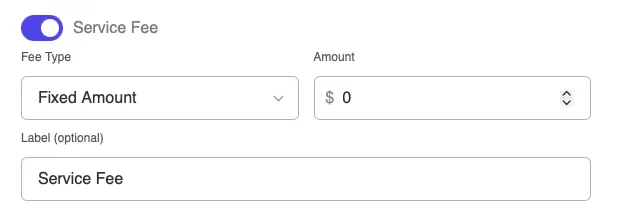
- Find the Service Fee section
- Configure your fee (see options below)
- Save your event
Fee Types
Fixed Amount
Charge the same fee regardless of ticket price:
- Example: $2.50 per ticket
- Best for: Consistent processing costs, simple pricing
| Ticket | Price | Fee | Total |
|---|---|---|---|
| GA | $25.00 | $2.50 | $27.50 |
| VIP | $75.00 | $2.50 | $77.50 |
| Student | $15.00 | $2.50 | $17.50 |
Percentage
Charge a percentage of the ticket price:
- Example: 5% per ticket
- Best for: Scaling with ticket value, premium events
| Ticket | Price | Fee (5%) | Total |
|---|---|---|---|
| GA | $25.00 | $1.25 | $26.25 |
| VIP | $75.00 | $3.75 | $78.75 |
| Student | $15.00 | $0.75 | $15.75 |
Configuring Your Fee
Fee Amount
Enter the fee value:
- For fixed: Enter the dollar amount (e.g., 2.50)
- For percentage: Enter the percentage (e.g., 5)
Fee Label
Customize what customers see:
- Default: “Service Fee”
- Examples:
- “Booking Fee”
- “Processing Fee”
- “Platform Fee”
- “Facility Fee”
Per Ticket vs. Per Order
Service fees are applied per ticket, not per order:
| Order | Fee per Ticket | Total Fees |
|---|---|---|
| 1 ticket | $2.50 | $2.50 |
| 3 tickets | $2.50 | $7.50 |
| 5 tickets | $2.50 | $12.50 |
How Customers See Fees
In the Ticket Form
When customers select tickets, they see:
Order Summary
─────────────────────────
2x General Admission    $50.00
Service Fee (2x $2.50)   $5.00
─────────────────────────
Total                   $55.00
On the Receipt
After purchase, the receipt shows:
- Individual ticket prices
- Service fees as line item
- Total charged
Transparency
Being clear about fees builds trust:
- Fee appears before checkout
- Customers know the total upfront
- No surprise charges at payment
Where the Fee Goes
Service fees are credited to the event organizer (you):
- Fee is part of the order total
- Collected through your normal payment process
- Shows in your revenue reports
When to Use Service Fees
Good Use Cases
Cover payment processing:
Credit card processors charge 2.9% + $0.30. A small service fee can offset this:
- $2.00 fixed fee covers most transactions
- 3% percentage fee matches processor cost
Platform or venue fees:
If you pay fees to use a ticketing platform or venue:
- Pass some or all cost to ticket buyers
- Common in the event industry
Premium experience:
For events with extra services:
- Fee covers things like reserved seating systems
- Helps fund customer support
When to Skip Fees
Free events:
If tickets are free, adding fees may seem odd.
All-inclusive pricing:
Some prefer to build fees into ticket prices for cleaner numbers.
Competitive markets:
If similar events don’t charge fees, yours may seem more expensive.
Fee Strategies
Cover Processing Costs
Most payment processors charge around 2.9% + $0.30 per transaction.
For a $25 ticket:
- Processing cost: ~$1.03
- Service fee: $1.50 (covers cost with small margin)
Round Number Totals
Set fees so totals are clean numbers:
- Ticket: $23.00
- Fee: $2.00
- Total: $25.00 ← Nice round number
Tiered by Ticket Type
While fees are set per-event, consider your ticket mix:
- Lower-priced tickets: Fixed fee works better
- Higher-priced tickets: Percentage fee works better
- Mixed: Choose based on your most common ticket type
Displaying Fee Information
On Your Event Page
Consider adding text explaining fees:
“A small service fee is added to each ticket to cover booking and processing costs.”
In Your FAQ
Add a question about fees:
Why is there a service fee? The service fee helps cover payment processing and platform costs. It ensures we can continue providing a smooth ticket purchasing experience.
Troubleshooting
Service fee option not appearing
- Go to Voxel Events → Settings
- Make sure Enable Service Fees is on
- Save settings
- Refresh your event edit page
Fee not showing on ticket form
- Make sure you’ve added a fee amount in the event settings
- Check that the amount is greater than 0
- Verify you selected a fee type (fixed or percentage)
- Clear any caching plugins
Wrong fee amount showing
- Double-check your fee configuration
- Fixed = dollar amount (2.50 means $2.50)
- Percentage = percent value (5 means 5%)
- Make sure you selected the right fee type
Fee not appearing in order total
- Refresh the page
- Clear browser cache
- Check for JavaScript errors in browser console
- Contact support if issue persists
Legal Considerations
Service fees are common and legal, but consider:
Transparency
Always show fees before checkout. Hidden fees can:
- Violate consumer protection laws
- Damage your reputation
- Lead to chargebacks
Labeling
Use accurate labels:
- “Service Fee” is standard
- Don’t call it a “tax” unless it’s actually a tax
- Be honest about what the fee covers
Local Regulations
Some jurisdictions have rules about:
- Maximum fee percentages
- How fees must be disclosed
- Whether fees can be charged at all
Check your local regulations if unsure.